Loom Review
Screen and camera recording for quick, async video messages
Is this your product? Claim this page · Request a change
Looking for a Loom alternative? See our ranked comparison.→What is Loom?
Loom lets you record your screen, your camera, or both, and share the result as a link. It's built for quick explainer messages, walkthroughs, bug reports, and feedback, not polished marketing or sales video.
Atlassian bought Loom in 2023 for $975 million and has since folded it into its own pricing and product lineup. Recent development has focused on tighter Jira and Confluence integration (AI-suggested bug reports and work-item updates) and on growing the AI Suite (auto titles, summaries, chapters, filler-word removal), which used to be part of the Business plan but now sits behind the separate Business + AI tier.
Loom screenshots
Who it's for
- ✓ Teams who want the fastest way to record and share a screen or camera video
- ✓ Engineering, product, and support teams already using Jira and Confluence
- ✓ Async-first teams replacing status meetings with short video updates
Who should look elsewhere
- ✗ Sales teams that need per-prospect video landing pages, CTAs, and view analytics tied to a CRM
- ✗ Teams that want AI features (summaries, transcripts) without paying for a separate AI tier
- ✗ Anyone who needs more than 25 lifetime videos or recordings longer than 5 minutes on a free plan
Pros
- + Recording a video and sharing the link takes seconds, with no editing needed to get something usable
- + Deep native integrations with Jira and Confluence for bug reports and async updates
- + Reliable transcription in 50+ languages and a starter tier that's genuinely free
- + Unlimited workspace members even on the paid Business plan
Cons
- – AI features (auto titles, summaries, chapters, filler-word removal) sit behind the pricier Business + AI tier ($24/seat/month monthly) and aren't included in Business
- – Free Starter plan is capped at 25 total videos per person and 5 minutes per recording
- – Sales-specific features like prospect-facing video pages, CTAs, and outbound analytics are thin compared with dedicated sales-video tools
- – Enterprise pricing is quote-only, so larger teams can't get a self-serve cost estimate
Loom pricing
What you pay for
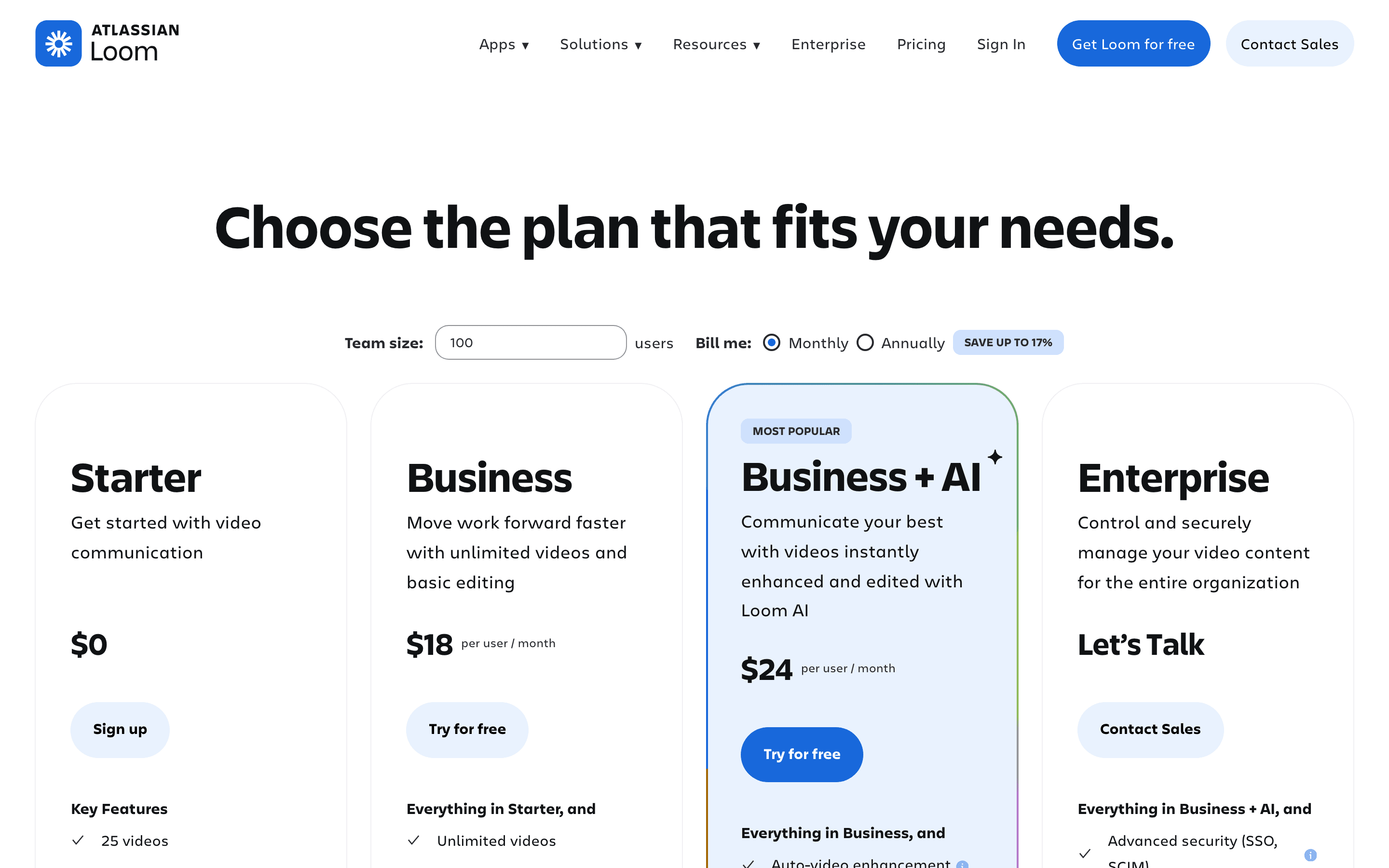
Loom charges per seat, so the price scales with how many people on your team can record and share videos. The cheapest paid plan, Business, is $18/seat/month and includes unlimited videos and recording time, basic editing, and no Loom branding. There's also a free Starter tier, capped at 25 videos per person and 5-minute recordings, plus a 14-day trial of Business + AI. Business and Business + AI pricing is public on Loom's site; only Enterprise pricing is quote-only through sales.
At about $18/month to start, it is one of the cheaper options in Video Messaging & Sales Video.
| Plan | Price | Highlights |
|---|---|---|
| Starter | Free | 25 videos total per person · 5-minute limit per recorded video · Unlimited meeting-recording length · Transcriptions in 50+ languages |
| Business | $18/seat/mo | Unlimited videos and recording time · Basic waveform editing · Remove Loom branding · Upload and download videos · Unlimited workspace members |
| Business + AI | $24/seat/mo | Everything in Business · AI-generated titles, summaries and chapters · Filler-word and silence removal · Auto meeting-recap emails and notes · Video-to-text automation · Admin insights |
| Enterprise | Custom | Everything in Business + AI · SSO and SCIM · Salesforce integration · 99.95% uptime SLA · Downloadable user insights |
The starting price shown is the monthly Business plan, $18/seat/month. Billed annually it drops to $180/seat/year, or $15/seat/month. Business + AI billed annually is $240/seat/year, or $20/seat/month. Both annual prices are confirmed in loom.com/pricing's own pricing data, not just the '17% savings' banner. Enterprise is quote-only through sales. Loom's own pricing page (loom.com/pricing) says the free Starter plan allows 'Up to 50 Members.' Atlassian's mirrored pricing page (atlassian.com/software/loom/pricing) instead caps Starter at 10 users. The two vendor pages disagree, and we couldn't confirm which one is current, so we don't state a workspace-member cap in the Starter tier's highlights above.
Pricing verified July 6, 2026 · source
How Loom's pricing compares
Loom next to its closest alternatives on entry price, billing, and whether pricing is public.
| Tool | Starting price | Billing | Free option | Pricing disclosed |
|---|---|---|---|---|
| Loom | $18/seat/mo | per-seat | Yes | Partly public |
| Sendspark | $49/seat/mo | per-seat | Trial (7 days, no credit card required) | Partly public |
| Vidyard | $59/seat/mo | per-seat | Yes | Partly public |
| Bonjoro | $15/seat/mo | per-seat | Yes | Partly public |
| Dubb | $42/seat/mo | per-seat | Yes | Partly public |
| Hippo Video | $20/seat/mo | per-seat | Yes | Public |
Is Loom still actively developed?
Last significant update: September 2025. Atlassian added new Loom AI workflows that turn a recording into an enhanced bug report and suggest Jira work-item updates, filling in the project, type, and priority fields straight from the video.
Top Loom alternatives
Further reading
- Best video tools for customer onboarding - Loom is fastest for one-off support clips. Vidyard, Hippo Video, and Sendspark add analytics and CRM sync for tracked onboarding programs. Here's the fit.
- How to switch from Loom to Vidyard - You'll pay about four times more per seat to switch from Loom to Vidyard, but you gain landing pages, CTAs, and CRM-linked video analytics Loom lacks.
- Best video prospecting tools for founder-led sales - Sendspark and Vidyard lead video prospecting tools built for outbound, with per-prospect pages and CRM sync. Loom is free but lacks sales features.
- SaaS free plans that are enough - Of eight verified SaaS free plans, Brevo, Zoho CRM, and Help Scout hold up for a real team long term. Loom, Mailchimp, and Apollo cap out within weeks.
Loom FAQ
Is Loom free?+
Yes. The Starter plan is free. It allows up to 25 videos per person, a 5-minute limit per recording, and unlimited-length meeting recordings.
How much does Loom cost per user?+
Business is $18/seat/month billed monthly, or $15/seat/month ($180/seat/year) billed annually. Business + AI, which adds Loom's AI Suite, is $24/seat/month billed monthly, or $20/seat/month ($240/seat/year) billed annually. Enterprise pricing is custom.
Do I need the AI plan to get transcripts and summaries?+
No. Basic transcription in 50+ languages comes with every plan, including Starter. You need the separate Business + AI plan for auto-generated titles, summaries, chapters, and filler-word removal.
Who owns Loom now?+
Atlassian bought Loom in a deal announced in October 2023 for $975 million. Loom is now sold and priced through Atlassian.