What e-signature software costs in 2026
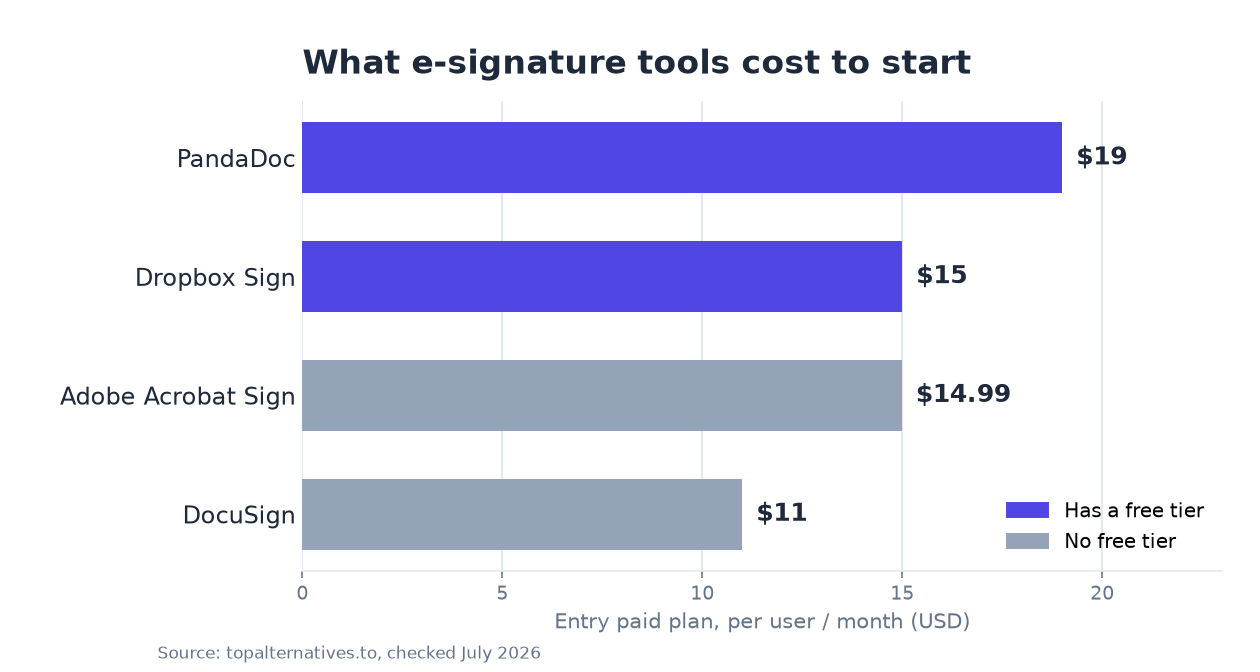
E-signature plans run $11 to $30 per user per month. DocuSign and Adobe have no free tier; Dropbox Sign and PandaDoc do. Here is what each plan costs.
E-signature software costs $11 to $30 per user per month on the main paid plans. Two of the big names, DocuSign and Adobe Acrobat Sign, have no free tier, while Dropbox Sign and PandaDoc do. The prices below are each vendor's list price, checked in July 2026. Enterprise tiers are quote-only, so confirm your own number.
What e-signature software costs
Here is the entry price and free-tier status for the four tools buyers compare most. Prices are per user per month.
| Tool | Free tier | Entry paid plan | Mid tier | Free trial |
|---|---|---|---|---|
| DocuSign | No | $11 (Personal) | $30 (Standard) | 30 days |
| Adobe Acrobat Sign | No | $14.99 (Standard) | $19.99 (Pro) | 7 days |
| Dropbox Sign | Yes | $15 (Essentials) | $25 (Standard) | 30 days |
| PandaDoc | Yes | $19 (Starter) | $49 (Business) | 14 days |
The entry ticket across the four most compared tools sits between $11 and $19 per user per month, and in every case the plan a working team ends up on is the one above it. The spread at the entry line is narrow enough that price alone rarely decides the purchase. The spread at the mid tier is wider, because that is where each vendor loads the features it considers business grade. Treat the entry column as the cost of one person signing things, and the mid tier column as the realistic starting point for a team with a shared inbox, a template library and someone who needs to see whether a contract has been opened. It is also worth noting that vendors quote these figures on annual commitments, and paying month to month generally lands higher than the number on the pricing page, so the sticker price and the invoice are not always the same thing.
Free plan or free trial
Dropbox Sign and PandaDoc each have a free plan for light use. DocuSign and Adobe Acrobat Sign do not. Instead they give you a free trial: 30 days on DocuSign and 7 days on Adobe. If you only need to send a document now and then, a trial or a free plan may cover you without a subscription at all.
A free e-signature plan is designed to cover one person sending a small number of documents, and it stops covering you the moment a second person needs to send under the same account. The limits that bite first are usually the monthly document allowance, the number of templates you can save, and whether you can add teammates at all. Branding is another common cutoff: free plans send in the vendor's colours, with the vendor's name on the request email, which is fine for an internal form and less fine for a customer contract. Bulk sending, signing order, audit controls and integrations are almost never in a free tier. The practical test is simple: if signing is part of how you close business rather than an occasional errand, the free plan is a trial with no clock on it, not a destination. Also watch the trial lengths, because 7 days on Adobe is short enough that you should have your test documents ready before you start it, while 30 days on DocuSign or Dropbox Sign gives you room to run a real workflow through it.
Where the price jumps
The entry plans, from $11 to $19, are built for one person or a small team sending the occasional document. The features most businesses actually need sit a tier up: bulk send, signing order and routing, integrations, and admin controls. That is where the price climbs. DocuSign Business Pro is $45, PandaDoc Business is $49, and Adobe's team plans run $23.99 to $29.99. Above those, all four move to quote-only enterprise pricing that you negotiate.
The jump from entry to business tier is the single largest cost decision in this category, because it can more than double the per seat price without adding a single extra user. Two things drive teams over that line. The first is other software: if signature status needs to appear in your CRM or your HR system, integrations are a paid tier feature almost everywhere. The second is control: shared templates, enforced fields, user roles, and an exportable audit trail are what compliance and finance teams ask for, and they are rarely in the cheapest plan. There is a third, quieter trigger, which is send volume. Entry plans cap how many documents each user can send in a year, and hitting that cap forces an upgrade at whatever point in the year you hit it, not at renewal.
Adobe bundles more than signing
Adobe Acrobat Sign is sold as part of Acrobat, so its plans (Standard, Pro, and Studio) include PDF editing, conversion, and commenting alongside e-signature. If you already pay for Acrobat, signing may be included in what you have. If you only ever need signatures, a dedicated tool like Dropbox Sign is usually cheaper for that one job, since you are not paying for the rest of the PDF suite.
The question to answer before buying Adobe Acrobat Sign is whether you would still want the PDF tooling if the signing feature vanished, because that is what the $14.99 entry price is really buying. For teams that live in PDFs, redlining vendor agreements, flattening forms, merging exhibits, the bundle is genuinely good value and removes a second subscription. For a sales team that produces documents in a CRM or a proposal tool and only needs a signature at the end, the PDF half of the bundle sits unused on every seat, every month. Check your existing licences first. Acrobat is often already deployed to finance, legal and operations, and buying a separate e-signature product for those same people is a duplicate spend that nobody notices until someone audits the software list.
Two cheaper routes: SignNow and Documenso
Not every buyer needs a name from the top of the comparison table, and two options sit outside the main four for very different reasons.
SignNow starts at $8 per month, the lowest entry point of any tool here, while Documenso starts at $25 per seat and offers a free tier plus an open source codebase you can host yourself. SignNow is the pick when the requirement is genuinely just signatures at the lowest defensible price, and it is a common landing spot for teams that found DocuSign's mid tier hard to justify. Documenso is the opposite trade: the per seat price is at the higher end, but you get a self hosting route, which matters when data residency or a security review makes a hosted US service awkward. Self hosting is not free in practice, since somebody has to run it, patch it and answer for uptime, so treat the $25 per seat cloud plan as the honest comparison against DocuSign and Dropbox Sign rather than the hosted-it-yourself version.
What the bill looks like as the team grows
Entry prices are quoted per user, which sounds harmless until you count who actually needs an account.
Per seat pricing punishes teams that give everyone a licence and rewards teams that route documents through a small number of senders, because only the person sending needs a paid seat, not the person signing. At a handful of seats, the difference between an $11 plan and a $19 plan is small enough that features should decide it outright. Once you are several times that size, the same gap is a line item that finance will question, and the mid tier upgrade multiplies across every seat at once. Two habits keep the bill down. First, audit who sends: sales and HR usually send constantly, while most other departments send a few documents a quarter and can go through a shared sender. Second, watch for seats that stay licensed after people change roles, since per seat billing renews whether the seat is used or not. Recipients never pay, so a large signing audience costs nothing extra; a large sender roster is what drives the number.
Who each tool is wrong for
Every tool here is a bad fit for somebody, and knowing which one is wrong for you is faster than ranking which is best.
DocuSign is wrong for teams that want a cheap all-in plan, Adobe is wrong for teams that will never touch the PDF tools, PandaDoc is wrong for teams that only need a signature and no proposal builder, and Dropbox Sign is wrong for teams that need deep document automation. DocuSign's $11 Personal plan is a single user product, so any team buying it will be shopping the $30 Standard tier or higher within months. Adobe's 7 day trial also makes it the hardest of the four to evaluate properly if your procurement cycle is slow. PandaDoc's $19 Starter looks competitive next to Dropbox Sign's $15, but you are paying toward a proposal and quoting engine, which is wasted if your documents arrive finished. Dropbox Sign is clean and cheap for signing, and that focus is exactly the limitation once you want dynamic pricing tables or CPQ-style logic in the document itself.
What to pick
If you want to start free, Dropbox Sign and PandaDoc both have a free plan. If you send documents rarely, DocuSign or Adobe's trial covers a short burst. If you are weighing a switch off DocuSign on cost, our ranked DocuSign alternatives guide compares each option with verified pricing and a verdict on fit. For proposal and quote-heavy workflows, the PandaDoc alternatives guide covers the document-automation side.
For most small teams the honest answer is to start on a free plan or a 30 day trial, count how many people genuinely need to send, and only then price the mid tier, because that is the number you will actually pay. If cost is the binding constraint, SignNow at $8 per month is the floor. If control over your data matters more than price, Documenso at $25 per seat with a self hosting option is the outlier worth a look. And if you already pay for Acrobat, check what your existing licence includes before you buy anything at all.
Keep reading
FAQ
Is there a free e-signature tool?+
Dropbox Sign and PandaDoc both have a free plan for light use. DocuSign and Adobe Acrobat Sign do not, but each offers a free trial: 30 days for DocuSign and 7 days for Adobe.
How much does DocuSign cost?+
DocuSign has no free tier. Paid plans are $11 per seat on Personal, $30 on Standard, and $45 on Business Pro. Enterprise pricing is custom. A 30-day free trial is available.
What is the cheapest e-signature software?+
DocuSign's Personal plan at $11 per seat is the lowest entry price. If you want a free plan rather than a trial, Dropbox Sign and PandaDoc both have one.
Sources
Should your product be on this list?
If you build a tool that belongs next to the ones above, submit it. A human reviews every submission. Approved products get their own page with pricing and screenshots, plus a place in the comparisons where they fit. It is free. You sign in with your work email so you can follow the decision, and there is no password to create.
Spotted something wrong or out of date? Report it and we'll check it against the source.