What meeting scheduling software costs in 2026
Most meeting schedulers run $10 to $20 per user per month, and Calendly, Cal.com, Reclaim, and Vimcal have real free tiers. Here is what each plan costs.
Most meeting scheduling software costs $10 to $20 per user per month on the entry paid plan, and several tools have a free tier that covers solo use. The prices below are each vendor's list price, checked in July 2026. Enterprise tiers are quote-only, so treat them as a starting point and confirm your own number.
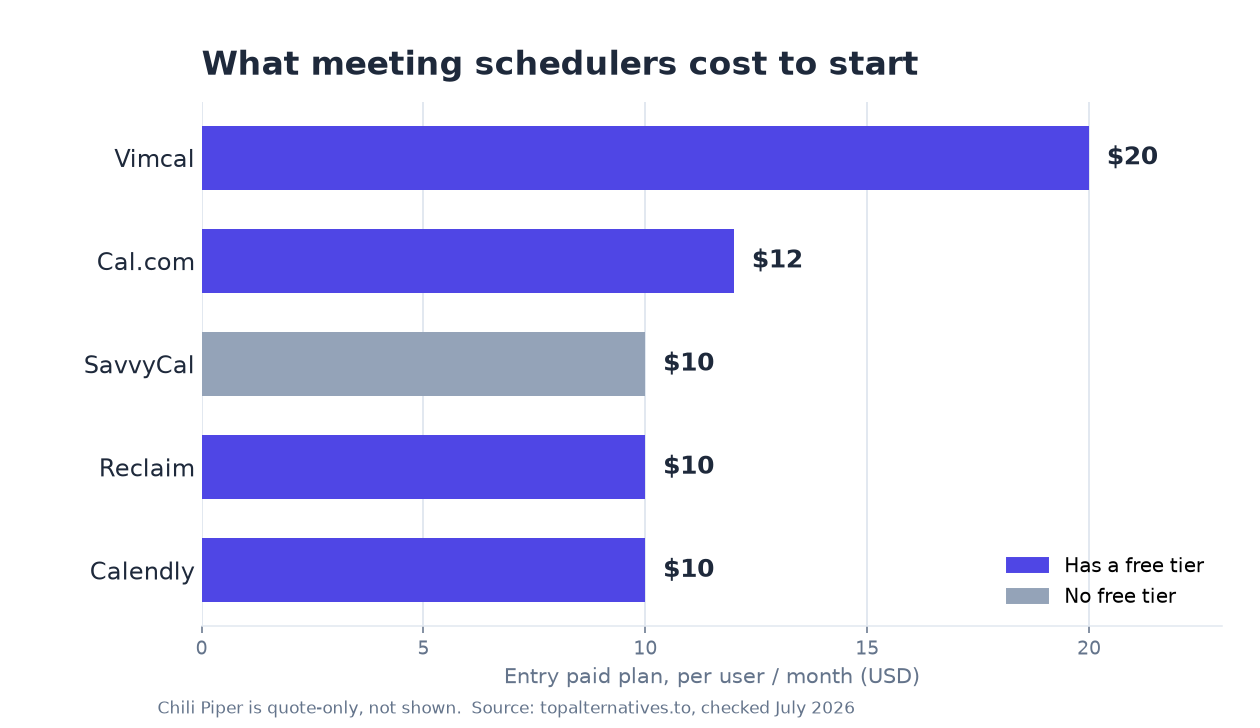
What meeting scheduling software costs
Here is the entry paid price and free-tier status for the tools buyers compare most. Every price is per user per month unless noted.
| Tool | Free tier | Entry paid plan | Higher self-serve tier | Billing |
|---|---|---|---|---|
| Calendly | Yes | $10 (Standard) | $16 (Teams) | Per seat |
| Cal.com | Yes | $12 (Teams) | $28 (Organizations) | Per seat |
| Reclaim | Yes | $10 (Starter) | $15 (Business) | Per seat |
| SavvyCal | Limited | $10 (Basic) | $17 (Premium) | Per seat |
| Vimcal | Yes | $20 (Standard) | $75 (Vimcal EA) | Per seat |
| Chili Piper | No | Quote only | Quote only | Custom |
The entry paid tier across this category sits in a tight $10 to $20 band, so the number that actually decides your bill is how many seats you put on the higher tier, not which vendor you pick. Calendly, Reclaim and SavvyCal all open at $10, Cal.com at $12 and Vimcal at $20, which means the spread at the bottom of the range is small enough that features, not list price, should drive the shortlist. The second tier is where the tools separate: Reclaim's Business plan is $15, Calendly Teams is $16, SavvyCal Premium is $17, Cal.com Organizations is $28 and Vimcal EA is $75. One tool sits outside the band entirely. Motion starts at $29 per seat with no free tier, because it is not a pure scheduler; it bundles booking links with AI task planning and automatic calendar blocking, so you are buying a work management product with scheduling attached.
How scheduling tools price
Scheduling tools almost all charge per seat, per month. A seat is one person with their own booking page. The free tier usually covers a single user with basic booking links. Paid tiers unlock the team features: round-robin routing, multiple event types, deeper calendar and CRM integrations, and admin controls. That is why the gap between free and paid matters more than the headline number. Decide which people actually need routing and admin before you count seats.
Per-seat billing means your invoice tracks headcount, not meeting volume, so a light user who books two calls a month costs exactly the same as your busiest account executive. That has two practical consequences. First, teams with a long tail of occasional bookers overpay unless someone audits the seat list on a schedule. Second, tools that price by seat give you no relief in a quiet quarter, because the cost is fixed the moment the seat exists. Most vendors also offer a discount for paying annually rather than monthly, which is worth taking only if you are confident about headcount for the full term; annual commitments generally let you add seats mid-term but not remove them until renewal. Chili Piper is the exception to the whole pattern, since its custom pricing is negotiated around routing volume, connected records and the size of the revenue team rather than published per seat.
Which tools have a real free tier
Calendly, Cal.com, Reclaim, and Vimcal all have a free plan with a booking link. For one person sharing a booking link, the free tier is often enough. SavvyCal has a free plan too, but it only covers meeting polls and sharing your availability, not a full booking link, so a booking link starts at $10 per seat on Basic. Chili Piper is quote-only for its lead routing and scheduling product, which is built for revenue teams, though it also sells a standalone ChiliCal plan at $12 per seat.
The useful distinction is between a free tier that is a permanent home for a solo user and one that is really a demo. Calendly, Cal.com, Reclaim and Vimcal fall in the first group: a freelancer, consultant or single recruiter can run their whole booking workflow on them indefinitely. SavvyCal's free plan sits closer to the second, since polls and availability sharing solve part of the problem but leave you doing the back and forth a booking link is supposed to remove. Motion has no free tier, so evaluating it always means a trial and then a paid decision.
What the free tier stops covering
Free plans in this category almost always stop at one booking link, one calendar connection and no team routing, which is exactly the point where a second person joins the process. The usual walls are the same across vendors: a single event type rather than several, one connected calendar rather than work plus personal plus a shared team calendar, no round robin or collective scheduling, vendor branding on the booking page, no removal of the vendor's logo, limited or no automated reminders, and no admin view over who booked what. Payment collection, CRM writeback and workflow automation sit on paid tiers everywhere.
In practice, the trigger for upgrading is rarely volume. It is a second person needing to appear on the same booking link, a manager wanting one place to see the team's availability, or a compliance requirement that meetings land in the CRM automatically. If none of those apply, staying free is a legitimate long-term answer rather than a stopgap. If any of them apply, budget from day one for paid seats for the people involved, because the free plan will not stretch to cover them.
Where per-seat pricing adds up
All six tools bill per seat, so the entry price is only the start. A five-person team on Calendly Teams is $80 a month. The same team on Cal.com Organizations is $140. If most of your seats only need to share a booking link, keep them on the cheaper tier and reserve the higher tier for the people who need routing, round-robin, or admin controls.
At a handful of seats the difference between a $10 tool and a $20 tool is small enough that most teams should ignore it and choose on fit. The maths changes as headcount climbs, because per-seat pricing is linear: whatever gap exists between two vendors at five seats multiplies by the same factor as the team grows. A price difference that looks like rounding error for a small sales pod becomes a line item worth negotiating once the whole go-to-market org is on the tool. That is also the point where vendors will usually talk about volume discounts, so ask rather than assume the list price is final.
Two other things shift with scale. Admin overhead becomes real, so tools with proper user provisioning, SSO and central control of event types start earning their higher tier. And seat hygiene starts to matter: leavers, contractors and people who tried the tool once all keep billing until someone deactivates them. Mixing tiers is the single most effective lever, since the population that needs round-robin routing and CRM writeback is usually much smaller than the population that needs a booking link.
What you pay for beyond the seat price
The seat price is rarely the whole cost, because SMS notifications, paid add-ons, integrations gated behind higher tiers and the internal time to migrate booking links all land outside the number on the pricing page. Text message reminders are metered or capped on most plans. Payment collection usually requires a connected processor, which takes its own cut on top of your subscription. Deeper CRM routing, the feature most revenue teams actually want, tends to live on the top self-serve tier or in a quote-only plan.
Then there is switching cost. Booking links get embedded in email signatures, website pages, help docs and outbound sequences, so replacing a scheduler means finding and updating every one of them, and old links either redirect or break. Self-hosting Cal.com removes the per-seat licence for the open source path but replaces it with hosting, upgrades and someone on your side owning uptime, which is a real cost even when it does not appear on an invoice.
Who each tool is wrong for
Every tool here is a bad fit for someone, and the cheapest way to save money is to rule out the ones that were never built for your use case. Use this as a negative filter before you compare prices.
- Calendly is wrong for teams that need lead routing tied tightly to CRM ownership rules; it will do round robin, but the routing logic revenue teams want usually points elsewhere.
- Cal.com is wrong for a non-technical team that just wants a link and no maintenance, because its main advantage is extensibility and self-hosting, and Organizations at $28 per seat is a lot to pay for features you will not configure.
- Reclaim is wrong for someone who only needs a booking page, since its value is defending focus time and auto-scheduling tasks around meetings; buy it for calendar defence, not for links.
- SavvyCal is wrong for anyone expecting a free booking link, because the free plan covers polls and availability sharing only, so the real entry point is $10 per seat.
- Vimcal is wrong for occasional bookers, because at $20 per seat you are paying for a fast keyboard-driven calendar client, and the $75 EA tier only makes sense where someone manages calendars for other people full time.
- Chili Piper is wrong for small teams and solo users, since quote-only pricing with no free tier signals a product sold to revenue orgs with inbound volume to route.
- Motion is wrong for buyers who want scheduling alone, because $29 per seat with no free tier buys AI task planning you will underuse if meetings are the only problem.
Free trials
Most paid plans let you test before you pay. Calendly, Cal.com, and Reclaim each list a 14-day trial on their paid tiers. Vimcal offers a free trial with no credit card required. A trial is the fastest way to check routing and team features before you commit to a per-seat bill.
Use the trial on the tier you actually intend to buy, not the entry plan, because the features that justify the upgrade are the ones you need to verify. Get at least two people into the trial so round robin, collective events and admin permissions are exercised properly. Test the integrations that would otherwise be a dealbreaker, especially the calendar edge cases: multiple connected calendars, conflicting personal events, time zones and buffer rules. And confirm what happens when the trial ends, since some plans drop you to a free tier while others suspend the booking link entirely.
What to pick
If you want the lowest cost with a real free tier, Calendly and Reclaim both start at $10 and both have a usable free plan. If you want scheduling infrastructure you can extend or self-host, Cal.com is the closest fit. If you live in back-to-back meetings and want a fast calendar client, Vimcal is built for that but starts higher at $20. If you are replacing Calendly specifically, our ranked Calendly alternatives guide covers each option with verified pricing and a verdict on who it suits.
For a single user, start free and only upgrade when a second person needs to be on the link. For a small team, pick on fit rather than on the few dollars separating the entry tiers, and split seats across plans so only the people who need routing pay for it. For a revenue team routing inbound leads at volume, get a quote from Chili Piper and price it against the top self-serve tier of whatever you use today, since the comparison is about pipeline handled rather than seats filled. And if the real problem is that your calendar is full rather than hard to book, look at Reclaim at $10 or Motion at $29 before you buy another booking link.
Keep reading
FAQ
Is there a free meeting scheduler?+
Yes. Calendly, Cal.com, Reclaim, and Vimcal all have a free plan that covers a single user sharing a booking link. SavvyCal has a free plan too, but it only covers meeting polls and sharing your availability, not a full booking link, and Chili Piper has no free tier.
How much does Calendly cost?+
Calendly is free for basic scheduling. Paid plans are $10 per seat per month on Standard and $16 on Teams. Enterprise pricing is custom.
What is the cheapest paid scheduling tool?+
Calendly, Reclaim, and SavvyCal all start at $10 per seat per month. Calendly and Reclaim also include a booking link on their free plans, so they are the cheapest way to start. SavvyCal's free plan doesn't include a full booking link.
Sources
Should your product be on this list?
If you build a tool that belongs next to the ones above, submit it. A human reviews every submission. Approved products get their own page with pricing and screenshots, plus a place in the comparisons where they fit. It is free. You sign in with your work email so you can follow the decision, and there is no password to create.
Spotted something wrong or out of date? Report it and we'll check it against the source.