Squarespace Review
All-in-one website builder with polished templates and built-in ecommerce
Is this your product? Claim this page · Request a change
Looking for a Squarespace alternative? See our ranked comparison.→What is Squarespace?
Squarespace is a website builder that combines design templates, hosting, a drag-and-drop editor, and built-in ecommerce into one subscription. You pick a template, then add and rearrange content blocks like text, images, galleries, and product listings without touching code.
It's built for people who want a site that looks designed without hiring a designer. Every plan includes hosting, SSL, and 24/7 support, and every plan can sell products; the plan tiers mainly control transaction fees, contributor limits, and how much store and marketing tooling you get.
Pricing is disclosed on the site with named tiers and monthly and annual rates, though the live pricing page renders the numbers through JavaScript rather than static text, and Squarespace runs frequent promo pricing on top of the list rates.
Squarespace screenshots


Who it's for
- ✓ Founders and marketers who need a professional-looking site live this week without a developer
- ✓ Small stores that want hosting, checkout, and design in one bill instead of stitching together separate tools
- ✓ Creatives and service businesses where the template's look matters as much as the content
Who should look elsewhere
- ✗ Teams that need deep custom code, headless delivery, or pixel-level control over layout
- ✗ High-volume or complex stores that need advanced inventory, multi-warehouse, or deep app ecosystems
- ✗ Anyone who wants a genuinely free plan; Squarespace only offers a 14-day trial
Pros
- + Templates look polished out of the box, with less fiddling to get a professional result
- + Ecommerce, hosting, domain, and support are bundled into one plan and one bill
- + Transaction fees drop to 0% on Core and up, so growing stores aren't taxed on top of the plan fee
- + 24/7 support is included on every plan, including the cheapest one
Cons
- – No free plan, only a 14-day trial, so there's no way to run a live site for free long-term
- – No phone support; help is limited to live chat and email
- – Basic plan still carries a 2% commerce fee and a steep 7% fee on digital products
- – Customization is template-bound; heavily custom designs push you into code injection workarounds or a different platform
- – Trustpilot reviews for the company sit at 1.2 out of 5, with recurring complaints about support responsiveness and account access issues
Squarespace pricing
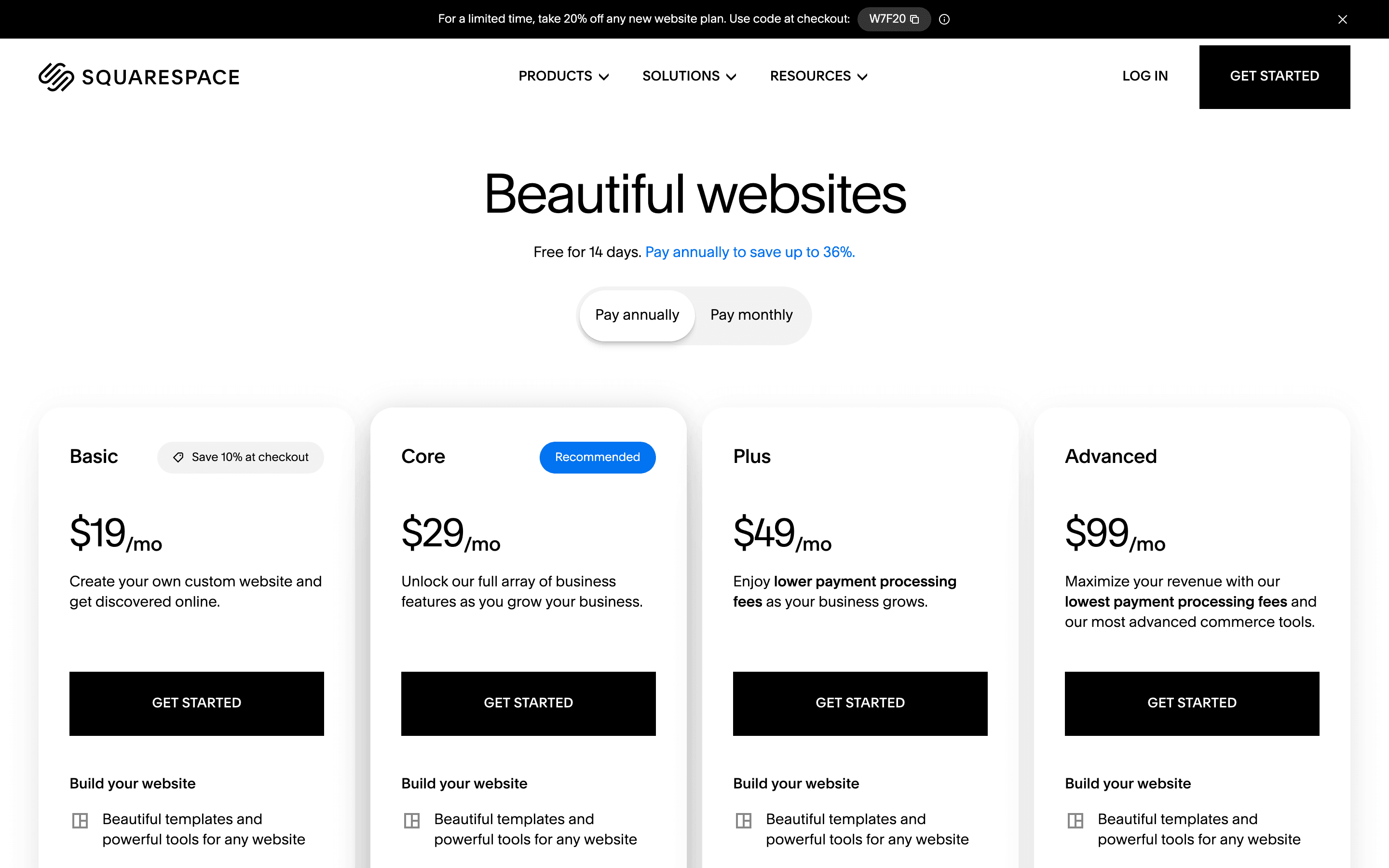
At about $19/month to start, it sits at the higher end of Website Builders pricing.
| Plan | Price | Highlights |
|---|---|---|
| Basic | $19/mo | Custom domain (free first year on annual billing) · Unlimited pages · Point of sale, customer accounts, and abandoned cart recovery included from this plan up · 2% transaction fee on commerce · 7% fee on digital products · 2 contributors |
| Core | $29/mo | No commerce transaction fee · 5% fee on digital products · Unlimited contributors · Promotional pop-ups, discounts, and carrier-calculated shipping · 5 hours video storage |
| Plus | $49/mo | No commerce transaction fee · 1% fee on digital products (down from 5% on Core) · Lower payment processing rate (2.7% + $0.30) · 50 hours video storage |
| Advanced | $99/mo | No commerce or digital product fees · Lower payment processing rate (2.5% + $0.30) · Advanced commerce APIs and priority support · Unlimited video storage |
Prices above are per month billed annually. Billed monthly, the same plans cost $25, $39, $65, and $139. Squarespace raised Basic, Core, and Plus prices in 2026 (Advanced is unchanged). Squarespace has no free plan, only the 14-day trial. On top of the plan fee, all plans pay standard card processing (around 2.9% + $0.30, lower on higher tiers) through Squarespace Payments. Point of sale, customer accounts, subscriptions, and abandoned cart recovery are available on every plan, including Basic; the tier differences are mostly about fees, discount/shipping tools, video storage, and contributor limits.
Pricing verified July 7, 2026 · source
How Squarespace's pricing compares
Squarespace next to its closest alternatives on entry price, billing, and whether pricing is public.
| Tool | Starting price | Billing | Free option | Pricing disclosed |
|---|---|---|---|---|
| Squarespace | $19/mo | tiered | Trial (14 days, no credit card required) | Public |
| Webflow | $15/site/mo | tiered | Yes | Partly public |
| Framer | $10/site/mo | tiered | Yes | Partly public |
| Wix | $17/mo | tiered | Yes | Partly public |
| WordPress.com | $9/mo | tiered | Yes | Partly public |
| Carrd | $9/yr | tiered | Yes | Public |
Is Squarespace still actively developed?
Last significant update: May 2026. Added Mobile Overrides, letting 7.1 sites adjust block design and animations for mobile independently of desktop, plus Quantity Limits for managing high-demand product and service availability on Core plans and up
Top Squarespace alternatives
Squarespace FAQ
Is Squarespace free?+
No. There's no free plan, only a 14-day trial that doesn't require a credit card. Every live site needs a paid plan starting at $19/month billed annually.
How much does Squarespace cost?+
Billed annually, plans run $19 (Basic), $29 (Core), $49 (Plus), and $99 (Advanced) per month. Billed monthly, the same plans cost more: $25, $39, $65, and $139.
Does Squarespace take a cut of sales?+
The Basic plan charges a 2% transaction fee on commerce and 7% on digital products. Core and above drop the commerce fee to 0%, while the digital product fee steps down to 5% on Core, 1% on Plus, and 0% on Advanced.
Can I get phone support?+
No. Squarespace support is 24/7 but limited to live chat and email; there's no phone line.